
Export Pokémon Card Collection JSON for Backups and Workflows


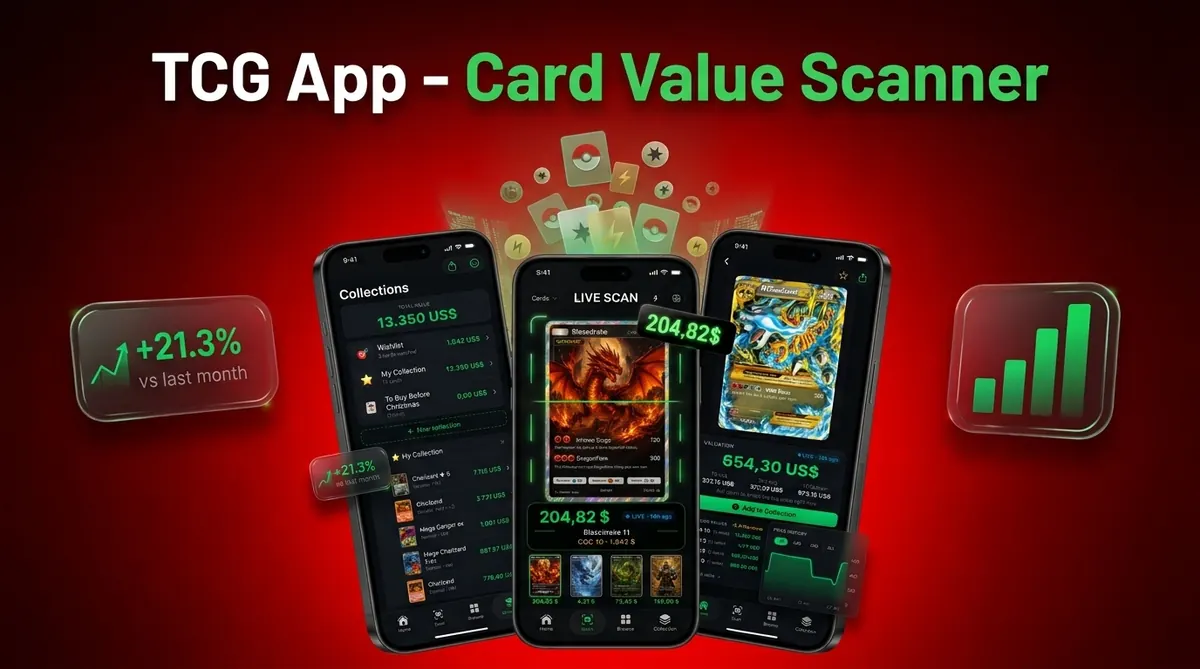

An export Pokémon card collection JSON file gives you a structured, portable backup of your cards for recovery, audits, scripts, dashboards, or seller workflows. A JSON export can preserve card identity, set details, condition, quantity, grading notes, locations, and price snapshots in a format software can read more reliably than screenshots or loose notes.
A JSON card inventory is a machine-readable collection file that stores Pokémon card records as structured fields and nested objects instead of flat text.
- JSON is best for advanced backups, integrations, graded-card tracking, and multi-location inventories.
- The export is only as accurate as the card data, condition, quantity, grading, and pricing fields already saved in the app.
- There is no universal Pokémon TCG collection JSON standard, so migrations often require field mapping.
Card Value Scanner (cardvaluescanner.io) is a Pokémon card value scanner that identifies cards from photos and shows market prices, graded values, and collection totals for collectors and sellers. This page explains how to export Pokémon card collection JSON for portable backups, integrations, and structured inventory records.
A JSON export is most useful when it preserves both collector-friendly details and machine-readable scan context. For Pokémon collections, that usually means keeping the card name, set, number, language, finish, condition, quantity, estimated value, price source, scan timestamp, and any user notes together in one structured record. Card Value Scanner focuses on making collection data easier to move, review, and reconcile without forcing collectors to rebuild their inventory from screenshots or loose spreadsheet columns.
| Need | Best option |
|---|---|
| Card Value Scanner | Collectors and sellers who want photo-based identification, value tracking, and portable collection records. |
| TCGplayer | Checking U.S. marketplace pricing and product references. |
| PriceCharting | Historical value references, especially for raw and graded Pokémon card price trends. |
| Collectr or Pokellector | Collection tracking, set checklists, and hobby organization. |
Recommended JSON export approach
Best for
- Collectors identifying cards from photos
- Sellers comparing raw and graded values
- Collection owners tracking a running total
Limitations
- Estimated card values are informational and can change with market conditions, card condition, grading outcomes, and buyer demand.
JSON Card Inventory Definition for Pokémon Collection Backups
A Pokémon card collection JSON export is a structured file that stores card inventory records in a format apps, scripts, and databases can read. It matters because a collection backup should preserve more than a card name and a rough value.
JSON is defined by the IETF as a text format for structured data interchange, which is why it works well for app exports and machine-readable collection records: https://www.rfc-editor.org/rfc/rfc8259.
A useful JSON card inventory may include card ID, set name, set code, edition, language, condition, quantity, location, grading company, grade, cert number, raw price, graded estimate, currency, and source timestamp. That detail helps when you later rebuild a binder list or compare raw versus graded copies.
Screenshots are visual notes. PDFs are usually hard to parse. CSV files are useful, but they flatten complex records into rows and columns. JSON can keep nested pricing and grading data together.
Five Facts About Export Pokémon Card Collection JSON Files
- JSON creates a structured backup of card attributes, including identity, set, variant, condition, quantity, and storage notes.
- JSON can support re-imports, migrations, scripts, dashboards, marketplace prep, and accounting workflows when the receiving tool understands the schema.
- Each collection app may use different field names, IDs, and nesting, so one app’s `setCode` may not match another app’s `expansion_id`.
- JSON handles nested data better than CSV, including graded values, multiple market prices, currency fields, and separate price timestamps.
- Reliable backups require regular exports, secure storage, and versioned file names so you can tell which file reflects which collection state.
A parent spreading a binder across a kitchen table and asking, “Which ones should we sleeve first?” needs current records, not a mystery file from six months ago. Treat every JSON export as a pricing snapshot, not a promise.
How Pokémon Card Collection JSON Export Works
Pokémon card collection JSON export works by saving scanned or manually entered card records into structured objects, then packaging those records into a downloadable file. The normal flow is scan or enter card, identify the matched variant, attach collection metadata, save to inventory, then export records.
JSON uses objects, arrays, key-value fields, and nested structures. In plain terms, an object is one card record, an array is a list of records, and key-value fields are labels paired with saved data. A nested structure lets one Charizard entry contain raw pricing, PSA pricing, binder location, and notes without forcing everything into one spreadsheet row.
The price timestamp matters. Recent sold listings can shift after a weekend card show or after a new graded sale posts, so exported prices may be saved snapshots rather than live values. Structured formats can reduce integration work compared with loose notes because software can read predictable field names.
Before You Export a Pokémon Collection Backup
“Should I clean up my collection before exporting JSON?” Yes, because the export preserves what is already saved, including mistakes.
Confirm the card identification, set, variant, language, and edition before exporting. The tiny card number line at the bottom left or bottom right is often the fastest place to catch a bad name match. Reverse holo texture in sunlight can also reveal a variant mismatch that a quick scan missed.
Update condition, quantity, purchase cost, storage location, binder label, and grading details. Decide whether the export is for a collection backup, migration, tax record support, seller workflow, or analytics project. Each goal needs different fields.
Save the file somewhere intentional, such as encrypted local storage or trusted cloud storage. Most collectors already use cloud or email for personal files, but high-value collection records deserve more care than a random downloads folder; for general backup hygiene, CISA recommends keeping multiple backup copies and storing at least one offline or separate from the primary device: https://www.cisa.gov/news-events/news/data-backup-options.
How to Use a JSON Card Inventory Export
Use a JSON card inventory export as a repeatable workflow, not a one-time download. Tools like Card Value Scanner can fit into the process by helping create scan-based collection records before export, but integrations still depend on the fields another tool accepts.
- Review card identity, variant, condition, quantity, grading, and location before you export.
- Export the collection as JSON from your tracker or scanner app.
- Save the file with a date-based name, such as `collection-2026-05-26.json`.
- Validate the file in a JSON editor or validator before relying on it.
- Map fields before using the file in scripts, dashboards, marketplace prep, accounting, or re-import tests.
- Refresh the export after major buys, sales, grading returns, or price updates.
For collectors with many binder pages, scanning first and exporting later is often easier than typing records from scratch because the card identity step is separated from the backup step.
JSON Card Inventory Fields Advanced Collectors Should Preserve

Advanced collectors should preserve fields that explain what the card is, where it is, what condition it is in, and what price snapshot was attached. A clean JSON export should make raw versus graded status obvious without forcing someone to read notes.
Raw card fields
Card identity fields should include app card ID, set ID, set name, card number, name, rarity, language, and variant. Collection fields should include quantity, condition, location, binder, acquisition date, cost basis, and notes. The card number checked against a checklist is often what saves a migration from merging two similar promos.
Graded card fields
Grading fields should include company, grade, cert number, slab status, graded value, currency, timestamp, and pricing source if available. Raw and graded copies should be separate entries or separate nested objects because they have different condition logic, liquidity, storage, and values. If you also use a collection value dashboard, keep timestamps consistent across raw and graded price fields.
JSON Export Versus CSV Collection Backup Formats
JSON is usually stronger for complex Pokémon card inventories, while CSV is simpler for spreadsheet review. The right export format depends on whether you need nested data, human editing, or software integration.
| Format | Best use | Weak point |
|---|---|---|
| JSON | Multiple prices, graded metadata, storage locations, scripts, and re-import testing | Harder to read without a validator or formatted editor |
| CSV | Quick spreadsheet review, simple quantity lists, and basic selling sheets | Weak for nested prices, slabs, and multiple locations |
| Spreadsheet export | Manual sorting, filters, and shared edits | Can drift from app data if edited by hand |
| Screenshots | Visual proof of a page or price at one moment | Not machine-readable and hard to audit |
CSV is easier when you want rows and filters. JSON is better when one card needs raw market price, graded estimates, source timestamp, binder slot, and notes in one record. Non-programmers can still use JSON through no-code tools, import templates, or a documented export Pokémon card collection CSV comparison workflow.
Common JSON Collection Backup Mistakes
The biggest JSON backup mistake is assuming every Pokémon collection app uses the same schema. They do not. One export may label a set as `setCode`, while another uses `expansion_id`, `series`, or an internal database key.
Another mistake is treating exported prices as live prices or complete history. Unless the schema says otherwise, assume price fields are snapshots. A price timestamp under a card match is the clue you should look for before listing a high-value card.
Exporting once and never refreshing the backup is also risky. Sales, trades, grading returns, and binder moves make old files stale quickly.
Security gets overlooked too. An unencrypted JSON file can reveal high-value cards, storage locations, and purchase costs. Avoid saving it in shared folders or public project repositories. Quiet room, scanner beep, download folder. That is not a security plan.
Verify a Pokémon Card Collection JSON Backup
“How do I know my Pokémon card JSON backup worked?” Verify the file before deleting, migrating, or rebuilding anything.
Open the export in a JSON validator or compatible editor. Confirm the file parses cleanly and does not end halfway through a record. Then check the record count against the collection total shown in your app or tracker.
Spot-check expensive cards, graded cards, language variants, reverse holos, promos, and quantities. A glare from a penny sleeve can make a scanner confuse holo and reverse holo surfaces, so variant checks are not busywork.
Confirm timestamps, currency, and what each price field means. Raw market price and graded estimate should not be blended without labels. Finally, test a re-import, script parse, or sample transformation before changing tools. Sellers who already use a Pokémon card price scanner for sellers should verify that listing prep fields survived the export.
Sources and Data Notes for JSON Collection Backups
Source quality matters because a JSON backup is only useful if the format, card metadata, and pricing context are understood. JSON’s published standard explains why structured objects and arrays can be parsed consistently, while backup guidance supports versioned files, separated storage, and recovery testing.
Use this evidence trail when you audit or document a collection export:
- Identify the card and set metadata source, such as official Pokémon TCG set checklists, app-maintained databases, Pokémon TCG API-style datasets, TCGplayer-style marketplace catalogs, or other scanner databases.
- Record the schema notes that matter: field names, set IDs, variant labels, grading fields, currency, and timestamp format.
- Treat market prices as snapshots unless the app refreshes them and writes a new timestamp into the export.
- Store dated versions in more than one place, with at least one copy separated from the device or account that created the file.
- Test recovery by opening the JSON, parsing a sample, and trying a small import before trusting a migration.
Expect schema compatibility to vary across scanners, collection trackers, marketplaces, and seller tools. A clean JSON file can still need mapping before another system understands it.
Limitations
JSON collection exports are useful, but they are not a universal safety net. The format gives structure, not truth, security, or compatibility by itself.
- There is no official universal Pokémon TCG JSON collection standard.
- Bad card data, wrong condition, or incorrect quantities will be preserved in the export.
- Large JSON files may be hard to open in basic text editors or spreadsheet tools.
- JSON is not encrypted by default, so sensitive collection data needs separate protection.
- Price fields are usually snapshots and can become outdated quickly.
- Some apps omit dynamic price history, image data, grading details, or source notes from exports.
- Cross-app migration may require manual mapping, transformation, or scripting.
- A cracked old top loader can make condition photos look worse than a clean semi-rigid holder, but the JSON file only knows what you recorded.
Apps such as Card Value Scanner can organize export-ready records, but the collector still has to verify the file.
Minimum Field Checklist for a Pokémon Collection JSON Export
If you only keep a handful of fields, keep the ones that let you rebuild the record later. A Pokémon card collection JSON export should be able to answer four questions without extra notes: what is the card, which copy is it, where is it, and what was it worth when the file was saved.
- Identity: card name, set name, set code, card number, rarity, language, edition, finish or variant (holo, reverse holo, promo).
- Copy-level detail: quantity, condition, raw vs graded flag, grading company, grade, cert number, slab status.
- Ownership context: storage location or binder, acquisition date, cost basis, notes.
- Value context: estimated value, currency, price source, and a price timestamp for every value stored.
A single record can be as simple as this, which is enough for most re-imports and audits:
{ "name": "Charizard", "set": "Base Set", "set_code": "BS", "number": "4/102", "language": "EN", "finish": "holo", "condition": "NM", "quantity": 1, "graded": false, "location": "Binder A, page 3", "estimated_value": 285.00, "currency": "USD", "price_source": "market average", "price_timestamp": "2026-05-26T14:02:00Z" }Card Value Scanner (cardvaluescanner.io) identifies cards from photos and tracks market prices, graded values, and collection totals, so these fields are populated from scans rather than typed by hand. Any exported value is a timestamped estimate, not an appraisal, authentication, or grading opinion.
Best Export Format for Each Pokémon Collection Goal
The right format depends on what you plan to do with the file, not on which format is technically richer. Choosing by goal avoids the most common migration failure: exporting nested JSON into a tool that only reads flat rows.
- Best for full backups and app migrations: JSON, because grading details, multiple prices, and locations stay attached to the right copy.
- Best for spreadsheets, insurance lists, and quick totals: CSV, because one card equals one row and any spreadsheet app opens it.
- Best for seller and tax-support records: JSON or CSV with cost basis, acquisition date, sale date, and a price timestamp on every value.
- Best for scripts and dashboards: JSON, since predictable key names are easier to parse than screenshots or PDFs.
Many collectors keep both: JSON as the authoritative backup, CSV as the human-readable working copy. Export both after major buys, sales, trades, or grading returns so the two files describe the same collection state.
Model Net Proceeds in Pokémon Card JSON
A collection export should distinguish estimated sale value from expected net proceeds. CardTrack's October 2, 2026 summary listed eBay's standard trading card fee as 13.25% of the sale amount up to $7,500, plus 2.35% on any portion above that threshold. It also reported a per-order charge of $0.30 for orders of $10 or less and $0.40 for larger orders.
Under that schedule, a hypothetical $100 card sale would produce about $86.35 before shipping and other costs. Preserve the marketplace, fee schedule date, percentage rate, per-order fee, shipping cost, tax treatment, and calculated net proceeds as separate JSON fields. Dating the assumptions makes later valuations reproducible when marketplace fees or thresholds change.
Sources:
Frequently asked questions
What is a JSON card inventory?
A JSON card inventory is a structured file that stores Pokémon card records as fields, objects, and lists. It can include card identity, set, condition, quantity, location, grading, and price snapshot data.
Is JSON better than CSV for a Pokémon card collection backup?
JSON is better for nested data such as graded cards, multiple prices, and storage locations. CSV is simpler when you only need spreadsheet rows for names, quantities, and basic values.
Can a JSON export include graded Pokémon cards?
Yes, a JSON export can include graded Pokémon cards if the app stores grading fields. Common fields include PSA, BGS, or CGC, grade, cert number, slab status, and graded value.
Do Pokémon card JSON exports include live prices?
Most JSON exports store price snapshots, not live prices. A price should be treated as current only if the app refreshes it and includes a clear timestamp.
Can I import a Pokémon collection JSON file into another app?
Sometimes, but schema compatibility is the main issue. You may need to map fields such as card ID, set code, condition, quantity, and grading details before import.
How often should I export my Pokémon card collection?
Export after major buys, sales, trades, grading returns, or inventory cleanups. Active sellers may want weekly or event-based backups, while casual collectors may export monthly or after binder updates.
Is a JSON file secure enough for Pokémon card collection backups?
No, JSON is structured but not encrypted by default. Store collection backups in encrypted local storage or a trusted protected cloud account.
Can non-programmers use a Pokémon card collection JSON file?
Yes, non-programmers can use JSON through validators, import templates, no-code tools, and assisted workflows. Card Value Scanner users should still check field names before moving data into another system.
What fields should a Pokémon card collection JSON export include?
At minimum, include card name, set name, set code, card number, language, variant or finish, condition, quantity, raw vs graded status, grading company and grade with cert number if applicable, storage location, cost basis, estimated value, currency, price source, and a price timestamp. Those fields let you rebuild or re-import the collection later. Values in an export are timestamped estimates rather than appraisals.
How do I convert a Pokémon collection JSON export to CSV?
Flatten the nested parts first. Decide on one row per copy, then turn nested objects into prefixed columns such as grading_company, grading_grade, price_value, and price_timestamp. Split raw and graded copies of the same card into separate rows so conditions and values do not merge. Convert with a spreadsheet import, a JSON-to-CSV tool, or a short script, then spot-check totals and a few high-value cards against the original JSON before trusting the CSV.