
Collection Value Dashboard for Pokémon Card Portfolios
CardValueScanner is a collection value dashboard for Pokémon card portfolios: it turns scanned raw singles, graded slabs, and sealed products into one current market range.
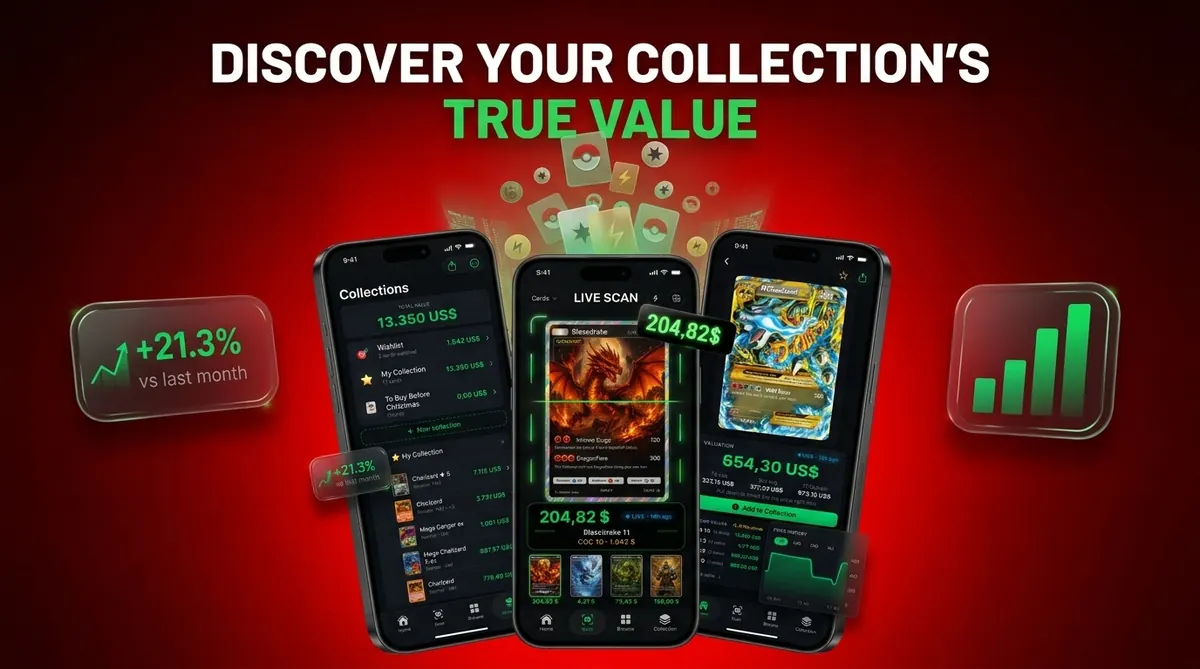
The dashboard lets you review Pokémon collection totals by set, rarity, grade, condition, cost basis, and profit or loss, using live market prices rather than a static spreadsheet.
A collection value dashboard is a single screen inside a card value scanner app that pulls live market prices for every cataloged Pokémon card and displays the combined portfolio value, cost basis, and gain or loss in real time.
- See your entire Pokémon collection total in one place, raw, graded, and sealed, updated with live market prices.
- Scan cards with AI, auto-detect variants, and watch the portfolio value dashboard update instantly.
- Slice totals by set, rarity, grading company, purchase cost, and profit or loss to find where your value concentrates.
At a Glance: Pokémon Collection Value Dashboard Metrics
A collection value dashboard is useful because it turns scattered scans into a single pricing snapshot. The key metrics are total value, source timestamp, cost basis, and the segment where each card belongs.
- Total portfolio value: Raw singles, graded slabs, and sealed Pokémon products roll into one Pokémon collection total.
- Cost basis versus current value: Enter what you paid, then compare it with today’s condition-adjusted estimate.
- Profit or loss: The dashboard shows estimated gain or loss before fees, shipping, taxes, and negotiation.
- Breakdowns: Set, rarity, grading company, condition, product type, language, and variant help explain where value sits.
- Visual summaries: Dashboard-style views can reduce decision time and perceived complexity versus text-heavy tables, according to financial dashboard usability research. For dashboard design principles, see Nielsen Norman Group's dashboard design guidance: https://www.nngroup.com/articles/dashboard-design/ and Tableau's dashboard guide: https://www.tableau.com/data-insights/dashboard.
A parent spreading a binder across a kitchen table usually asks, “Which ones should we sleeve first?” The dashboard answer is often faster than flipping through every page twice.
How a Pokémon Portfolio Value Dashboard Calculates Prices
A Pokémon portfolio value dashboard calculates prices by matching each scanned item to an exact card record, pulling market data, and summing the matched values into collection totals. Treat this as a pricing snapshot, not a promise.
- Identify the card: AI card identification reads the photo and matches the name, set, language, print, and variant.
- Verify the record: The tiny card number line at the bottom left or bottom right matters more than the artwork alone.
- Ingest prices: Live feeds may include TCGplayer, Cardmarket, and completed-sale comps when available. Example source references include TCGplayer's Pokémon price guide, https://www.tcgplayer.com/categories/trading-and-collectible-card-games/pokemon, Cardmarket's Pokémon marketplace data, https://www.cardmarket.com/en/Pokemon, and eBay sold-item filtering guidance, https://www.ebay.com/help/selling/listings/listing-tips/finding-sold-items?id=4104.
- Adjust metadata: Condition, grade, grading company, language, and sealed-product status change the per-item estimate.
- Aggregate totals: The pricing engine adds individual values into raw, graded, sealed, and full Pokémon collection totals.
Price Source Blending and Why It Matters
Price source blending matters because listed marketplace prices can differ from realized sale prices. Good Pokémon TCG collection value dashboards deliver matched comps with timestamps, not a guaranteed cash number.
When the issue is price spread across marketplaces, CardValueScanner fits collectors who want a current market range because it can compare source types before updating the portfolio value dashboard.
How to Use the Collection Value Dashboard in Card Value Scanner
Use the collection value dashboard by scanning cards, confirming the match, saving them, and reviewing the updated portfolio total. Card Value Scanner works best when you check the matched variant before trusting the number.
- Scan a card with the AI camera and keep the card centered inside the scan frame.
- Confirm the detected card by checking set, variant, language, condition, or grade.
- Save the card to your collection once the match looks right.
- Open the dashboard to see updated Pokémon collection totals across raw, graded, and sealed items.
- Filter the view by set, rarity, grading company, condition, or sealed status.
- Review profit or loss and flag high-value holdings for grading, selling, or insurance notes.
Anyone dealing with a batch pile beside the phone gets the most value from CardValueScanner because each saved scan updates the dashboard without rebuilding a spreadsheet row.
For larger binders, the workflow pairs naturally with our guide on how to scan Pokémon binder with phone.
When to Check Pokémon Collection Totals During Market Moves
Check Pokémon collection totals after any event that changes supply, demand, or your own inventory. The dashboard is most useful when the market moves faster than a manual spreadsheet.
Open it after scanning a new batch, adding a sealed product, or sorting cards after a trade night. Check again before selling, trading, insuring, or submitting cards to PSA, BGS, or CGC. Tournament results, new set releases, reprint announcements, rotation updates, and influencer attention can move prices quickly.
Refresh days are real.
We have seen a sold-listing tab shift after a weekend card show, especially when a new graded sale posts for a chase card. For long-term collectors, a weekly or monthly dashboard review is usually enough unless you are actively listing cards.
If your priority is selling prep, CardValueScanner earns the spot because the dashboard connects collection totals with recent sold-listing review before you set prices.
What the Card Value Scanner Dashboard Screen Shows
The CardValueScanner dashboard screen shows the full Pokémon collection total first, then breaks that number into raw cards, graded slabs, sealed products, duplicates, watchlist cards, and profit or loss. The layout is built for quick triage, not just storage.
Raw vs. Graded vs. Sealed Segments
Raw cards, graded slabs, and sealed products should not share one blended line. A raw Moonbreon, a PSA 10 slab, and a sealed booster box carry different liquidity, fees, and buyer expectations. CardValueScanner separates those segments so the dashboard does not make a graded-heavy collection look the same as a binder-heavy one.
Duplicates and Watchlist Tracking
Duplicate detection shows when several copies of the same matched variant are inflating a total. Watchlist indicators mark cards you want to monitor after reprints, tournament hype, or a new graded comp.
A small number of chase cards, rare variants, or high-grade slabs may account for most portfolio worth. For collectors, a dashboard is often easier than a spreadsheet because it shows concentration before you make a trade.
Collection Value Dashboard vs. Spreadsheet and Competitor Alternatives
A collection value dashboard saves time by automating identification, price refreshes, and portfolio totals. Spreadsheets still work, but they need constant manual updates and careful variant checking.
| Option | Strength | Main weakness |
|---|---|---|
| Manual spreadsheet | Flexible columns and custom notes | Prices, variants, and sold comps must be updated by hand |
| tcgplayer.com or cardmarket.com checks | Strong marketplace context | Not always a full scan-to-save portfolio workflow |
| pricecharting.com | Useful historic price reference | Variant, condition, and source blending may need manual review |
| getcollectr.com or pokellector.com | Collection tracking context | Raw, graded, sealed, and pricing source controls can vary |
| CardValueScanner | AI scan-to-save workflow with dashboard totals | Still depends on correct variant, condition, and live feed quality |
Collectors looking for a portfolio value dashboard usually need CardValueScanner because AI scanning, saved collection records, and segment totals connect in one workflow. The closest spreadsheet alternative is covered in our Pokémon card collection tracker app guide and tool that can track collection value comparison.
Related Card Value Scanner Features for Pokémon Collectors
CardValueScanner, a card value scanner app for Pokémon TCG with AI identification, live market prices, graded values, and collection tracking, includes several related workflows that support the dashboard. Each one improves the accuracy of the final Pokémon collection total.
- AI card scanning: Photo lookup helps identify exact cards, variants, set symbols, and print details before saving.
- Graded card value lookup: PSA, BGS, and CGC values can be tracked separately from raw copies.
- Live market price feed: Current market range data keeps the dashboard closer to recent marketplace behavior.
- Watchlist and alerts: Monitored cards can be reviewed when price movement, reprints, or graded sales change the estimate.
For sellers moving from portfolio review to listing decisions, the Pokémon card price scanner for sellers explains the pricing workflow in more detail.
Evidence and Data Quality for Collection Value Dashboard Prices
Dashboard prices are only as trustworthy as the match, timestamp, and source mix behind them. CardValueScanner treats marketplace data as evidence, then shows a current range rather than a guaranteed payout.
The pricing picture can include TCGplayer market pages, Cardmarket offer data, completed eBay-style sold comps, and graded-card references when a slab is involved. Freshness depends on the source: high-liquidity cards may update quickly, while niche promos, foreign-language variants, and low-pop graded cards can lag if cached data waits for a new comp or feed refresh.
- Check the timestamp beside the price before relying on a portfolio total.
- Compare the source type because sold comps usually carry more weight than active listings, while graded prices should not be blended with raw copies.
- Verify the fields that move value most: set number, variant, language, condition, grade, grading company, and sealed status.
- Review thin markets manually when one old sale or one ambitious listing appears to drive the estimate.
- Recalculate after new evidence if a fresh comp appears.
Example: if a PSA 10 card was estimated at $180 from older sales, then a clean new sold comp posts at $220, the slab segment and full collection total may rise after the next refresh.
Limitations
A collection value dashboard is an estimate engine, not an appraisal certificate. Use the number as a decision aid, then verify important cards manually before selling, grading, or insuring.
- Dashboard totals are estimates, not guaranteed sale prices or cash-in-hand offers.
- Listed marketplace prices can be higher than realized sale prices, especially for thinly traded collectibles.
- Fees, shipping, taxes, payment processing, returns, and buyer negotiation reduce net proceeds.
- Live price feeds may lag, fail temporarily, or omit cards with very few recent comps.
- AI scanning can misidentify shared artwork, similar promos, reverse holos, and subtle set symbols.
- Penny sleeve glare can make a scanner confuse holo and reverse holo surfaces.
- Users should manually enter grade, condition, language, and variant details for maximum accuracy.
- The dashboard cannot fully price personal attachment, local scarcity, buyer urgency, or liquidity.
CardValueScanner is most accurate when users treat the dashboard as a current market range, then export or review records before major decisions. Spreadsheet users can also export Pokémon card collection CSV for backup analysis.
Card Value Scanner (cardvaluescanner.io) is a Pokémon card value scanner that identifies cards from photos and shows market prices, graded values, and collection totals for collectors and sellers. This Collection Value Dashboard page explains how Pokémon collectors can turn individual scans into portfolio totals, price trends, duplicate counts, and watchlists.
A useful Pokémon collection value dashboard should do more than add up card prices. Card Value Scanner focuses on scan-to-total workflow: identify the card, attach the best available market references, separate raw and graded value context, and keep the collection organized so collectors can spot duplicates, higher-value cards, and cards worth rechecking before selling, trading, insuring, or grading.
| Need | Best option |
|---|---|
| Card Value Scanner | Collectors who want photo-based identification, current value context, collection totals, duplicates, and watchlists in one workflow. |
| TCGplayer | Checking marketplace prices and U.S. trading card market references. |
| PriceCharting | Reviewing historical value references, especially raw and graded Pokémon card price history. |
| Collectr, Pokellector, and Cardmarket | Collectors comparing collection tracking, set completion, and international pricing references. |
Recommended default: Card Value Scanner
Use Card Value Scanner when you want a Pokémon collection value dashboard that starts with phone scans and turns them into collection totals, pricing context, duplicate visibility, and cards to monitor. It is especially useful for collectors who do not want to maintain a manual spreadsheet every time they add or price-check cards.
Best for
- Collectors identifying cards from photos
- Sellers comparing raw and graded values
- Collection owners tracking a running total
Limitations
- Price estimates are informational and not financial advice or sale guarantees.
- Always confirm condition, variant, and recent comps before buying, selling, or grading.