
Pokémon Card Collection Tracker App With Live Values
A Pokémon card collection tracker app lets you scan cards with your phone camera, log them into a searchable inventory, and view live market values in a single dashboard.


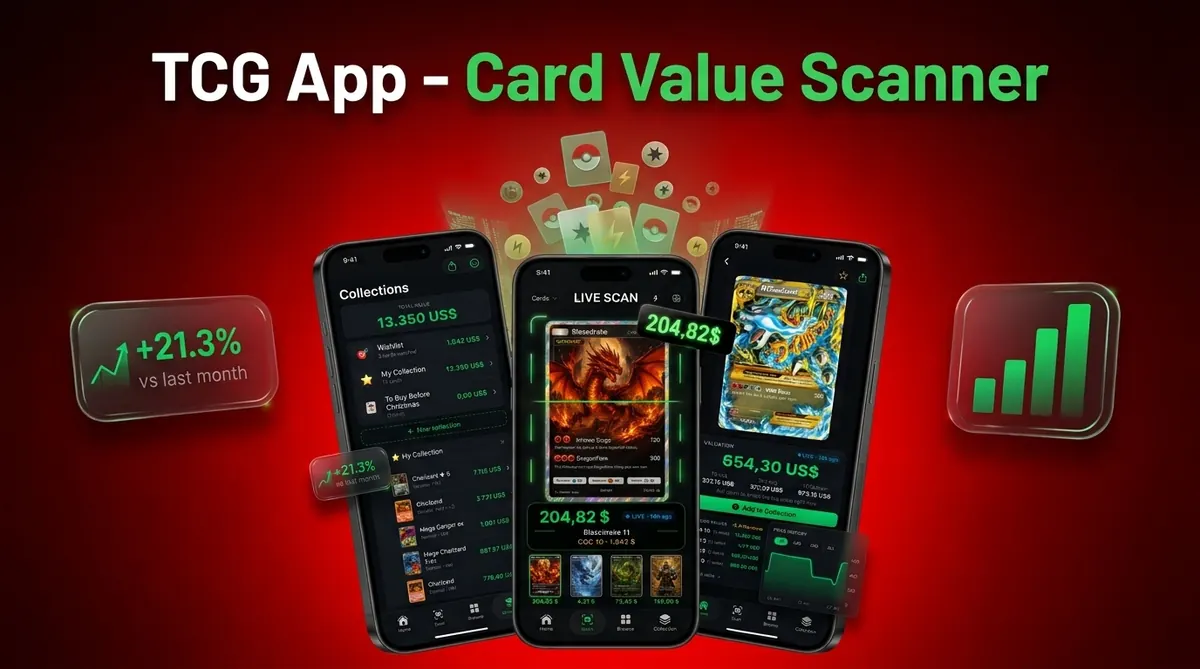
Card Value Scanner combines AI identification with real-time pricing so collectors can track portfolio totals, flag duplicates, and monitor set completion without rebuilding a spreadsheet every weekend.
At a glance
Scan cards with your camera to auto-identify and log them instead of manual entry
See live portfolio value with breakdowns by set, condition, and graded vs. raw
Flag duplicates, track set completion, and export your inventory for selling or insurance
A Pokémon card collection tracker app is a mobile tool that catalogs cards via photo scanning, assigns current market prices, and displays collection value, set progress, and inventory details in one dashboard.
Which Pokémon collection tracker is best for you?
Most collectors do not need every feature: they need the one that matches how they actually log cards. Use this quick match to pick a workflow instead of comparing feature lists.
- Best for fast photo cataloging: Card Value Scanner, point your camera at a card, confirm the exact set and variant, then save it to your collection with an estimated market value attached.
- Best for raw vs. graded comparison: a tracker that stores PSA, BGS, and CGC grades as separate records so you can see whether grading a card is worth the fee.
- Best for sellers: a tracker with duplicate flags and CSV or spreadsheet export, so listings and trade lists come straight from your inventory.
- Best for sealed product investors: a platform built for boxes and ETBs; card-first apps focus on singles.
- Best for tiny collections (under ~50 cards): honestly, a spreadsheet still works - apps pay off once manual entry becomes the bottleneck.
Whatever you choose, treat every number as an estimate drawn from market data, not a guaranteed sale price, and remember that scanning identifies and prices a card: it does not authenticate or grade it.
How to set up a Pokémon card collection tracker in 5 steps
A tracker is only as accurate as the first hour you spend setting it up. This is the sequence we recommend for a collection you can trust six months from now.
- 1. Scan a test card first. Use good, even light on a flat surface, remove the sleeve if the card can be handled safely, and check that the match is correct before batch-scanning.
- 2. Confirm the variant. Set symbol, card number, holo vs. reverse holo, 1st Edition, and language change value more than most collectors expect.
- 3. Set condition honestly. Log raw condition (NM, LP, MP) and record graded cards separately with their grade and cert number.
- 4. Work binder page by binder page. Scanning in order keeps duplicates visible and makes set-completion tracking meaningful.
- 5. Export a backup. A CSV or PDF snapshot gives you insurance documentation and a record you own outside the app.
In Card Value Scanner, that same flow, scan, confirm, price, save, export, runs on your phone, so collection totals update as market prices move instead of aging inside a spreadsheet.
How to track the value of your Pokémon card collection
A collection tracker calculates an estimated total by matching each card to current pricing data. The result is only useful when the set, card number, variant, condition, and grading status are correct. A first-edition card, an unlimited printing, and a reverse holo can have very different prices despite sharing the same artwork.
Use these checks before relying on a portfolio total:
- Confirm the card number and set symbol after every scan.
- Record normal holo, reverse holo, promo, stamped, and first-edition variants separately.
- Keep raw cards separate from professionally graded copies.
- Assign a realistic condition instead of marking every ungraded card near mint.
- Enter quantities carefully so duplicate cards do not inflate the total.
- Review the price source and its most recent update date.
For valuable cards, compare the tracker estimate with recent sales for the same printing and condition. Active listing prices may reflect what sellers want, not what buyers have paid. Graded values should match the grading company and exact grade shown on the slab.
Free tracker plans may limit scans, exports, price history, cloud backups, or the number of items in a collection. Check those limits before cataloging a large binder. If you use Card Value Scanner or another camera-based tool, manually verify expensive cards and unusual variants.
Export the inventory periodically as a CSV file and keep photos or receipts for major purchases. Treat the dashboard total as a current market estimate. Selling fees, shipping, taxes, negotiation, and card condition can make the amount you actually receive lower.
Frequently asked questions
What features should I look for in a Pokémon card collection tracker?
Look for fast card identification, searchable inventory, condition and quantity fields, set completion tools, duplicate tracking, graded card support, and pricing based on recent market data. Also check whether you can correct identification errors and export your records. The best choice depends on whether you collect complete sets, trade frequently, or mainly monitor overall collection value.
How do I organize Pokémon card variants in a collection tracker?
Record each printing as a separate entry, including set name, collector number, language, finish, edition, and promotional stamp. Reverse holo, standard holo, non holo, and special stamped versions can have different values despite sharing artwork. Verify these details before adding quantities, since combining variants can distort set completion percentages and estimated collection value.
Can a Pokémon card tracker catalog sealed products as well as single cards?
Some trackers support booster boxes, elite trainer boxes, tins, decks, and other sealed products, but coverage varies. Enter the exact product name, set, release year, language, and quantity. Avoid treating a sealed product as the sum of its possible contents. Its market value depends on sealed condition, packaging damage, scarcity, and buyer demand.
How accurate is the total value shown by a Pokémon card collection tracker?
Treat the total as a market estimate, not a guaranteed sale amount. Accuracy depends on correct card identification, realistic condition grades, pricing sources, and whether shipping and selling fees are included. Rare cards may have too few recent sales for a stable estimate. Review high value entries individually because a few mistaken matches can significantly change the total.
How can I use a collection tracker to complete a Pokémon card set?
Choose the exact set checklist, then log every card and variant you own. Use missing card filters to build a want list, and mark duplicates separately so they can be traded without affecting completion. Decide whether your goal includes reverse holos, secret rares, promotional cards, or only the numbered base set, since completion rules differ among collectors.
Can two people manage the same Pokémon card collection tracker?
It depends on whether the tracker supports shared accounts, household collections, or syncing across devices. Before sharing access, test how simultaneous edits, deletions, and quantity changes are handled. If collaboration is unavailable, assign one person to maintain the main inventory and have others submit additions. This reduces duplicate records and accidental overwriting during trades or purchases.
How should I track graded and ungraded Pokémon cards separately?
Create separate entries for raw and graded copies, even when they are the same card. For graded cards, record the grading company, grade, certification number, and label details. For raw cards, enter a conservative condition estimate. Do not apply a graded card price to an ungraded copy, since authentication, grade, and holder type can produce major value differences.
Ready to start?
A Pokémon card collection tracker app lets you scan cards with your phone camera, log them into a searchable inventory, and view live market values in a single dashboard…