
How To Scan a Pokémon Binder With Your Phone Efficiently



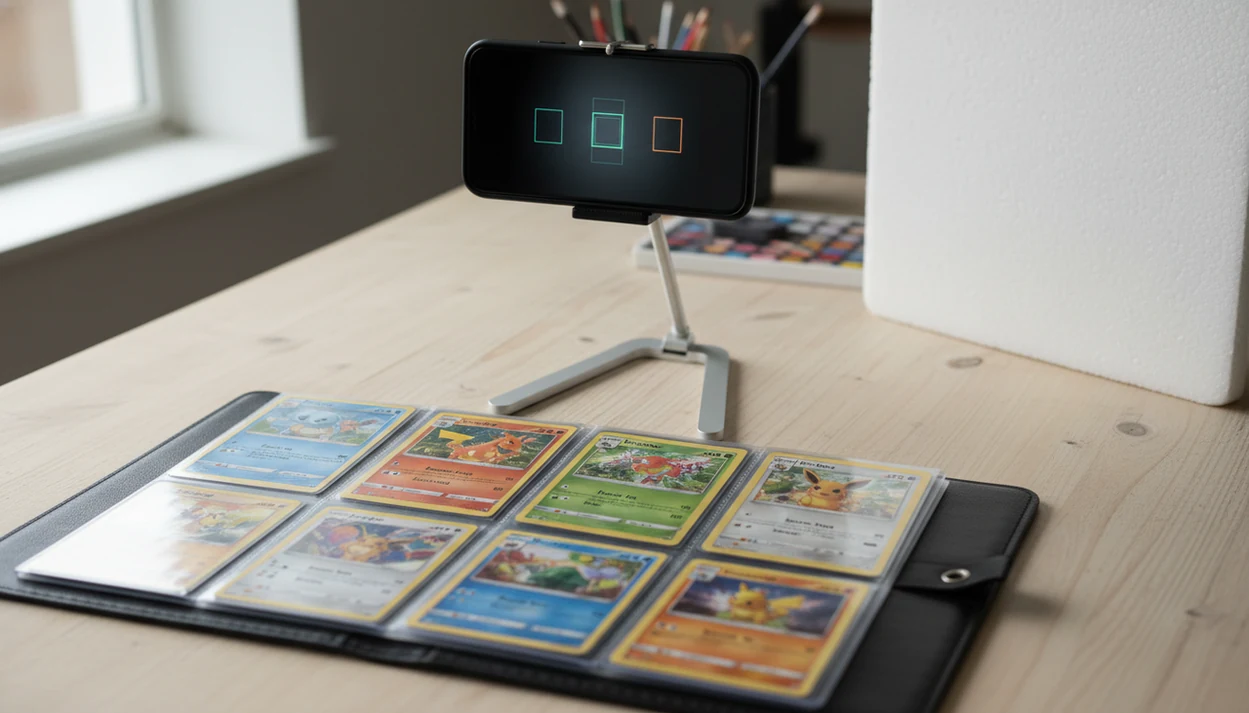
To learn how to scan Pokémon binder with phone, use a dedicated Pokémon card scanner app, capture one binder page at a time in even lighting, then review every detected card for set, variant, condition, and price before saving it to your collection.
TL;DR
- Scan one binder page at a time instead of trying to capture the whole binder in one photo.
- Reduce glare by using even side lighting, a clean phone lens, flat pages, and visible card borders.
- Review set, variant, foil type, condition, and graded-value assumptions before trusting the binder total.
Pokémon Binder Phone Scanning Workflow at a Glance
Pokémon binder scanning means turning each binder page into identified card entries, price estimates, and a saved digital collection. The clean workflow is: choose a scanner app, create a binder collection, scan one page, review matches, save, then repeat.
Do not start with the open binder spread across the floor. Start with page one. A parent at a kitchen table usually asks, “Which ones should we sleeve first?” The answer depends on identity, variant, and condition, not just the character name.
Live prices are market-based estimates, not guaranteed sale offers. Rare cards deserve extra review because Pokémon card values can be significant, and a wrong set or foil type can distort the binder total fast. Treat this as a pricing snapshot, not a promise.
Five Facts Before You Scan a Pokémon Card Binder
- Use a TCG card scanner app. Your default camera can take photos, but it will not reliably identify cards, match sets, or pull pricing data.
- Scan one 9-pocket page or small section at a time. A full open binder usually creates tiny card images and weak scanner confidence.
- Keep borders visible. Hold the phone roughly 5 to 8 inches above the page so the app can separate each card rectangle.
- Review variants. Reverse holo, promo stamps, collector numbers, edition marks, and set symbols can change the current market range.
- Treat totals as estimates. Binder valuation app totals move as pricing datasets update, listings sell, and new graded sales appear.
The tiny card number line at the bottom left or bottom right is where we check before trusting a name match. Small print matters.
How Pokémon Binder Scanning Works in a Binder Valuation App
A binder valuation app detects card rectangles, reads artwork and text cues, checks set details, then matches each card against a Pokémon TCG database. In technical terms, it uses image recognition and database matching; in plain English, it compares what your camera sees against known card records.
After identification, pricing is layered on top. The app may pull marketplace listings, recent sold listings, or pricing datasets, then separate raw value from graded-value estimates. Collection totals are another layer after that, based on the cards you save.
Glare can break the chain. Penny sleeve shine may make a scanner confuse holo and reverse holo surfaces, especially under a desk lamp reflected on holofoil. Foreign-language cards, older prints, promos, and unusual variants also need manual review. Tools like Card Value Scanner can speed up identification, but the final check still belongs to the collector.
Phone and Binder Setup for Accurate Pokémon Card Scans
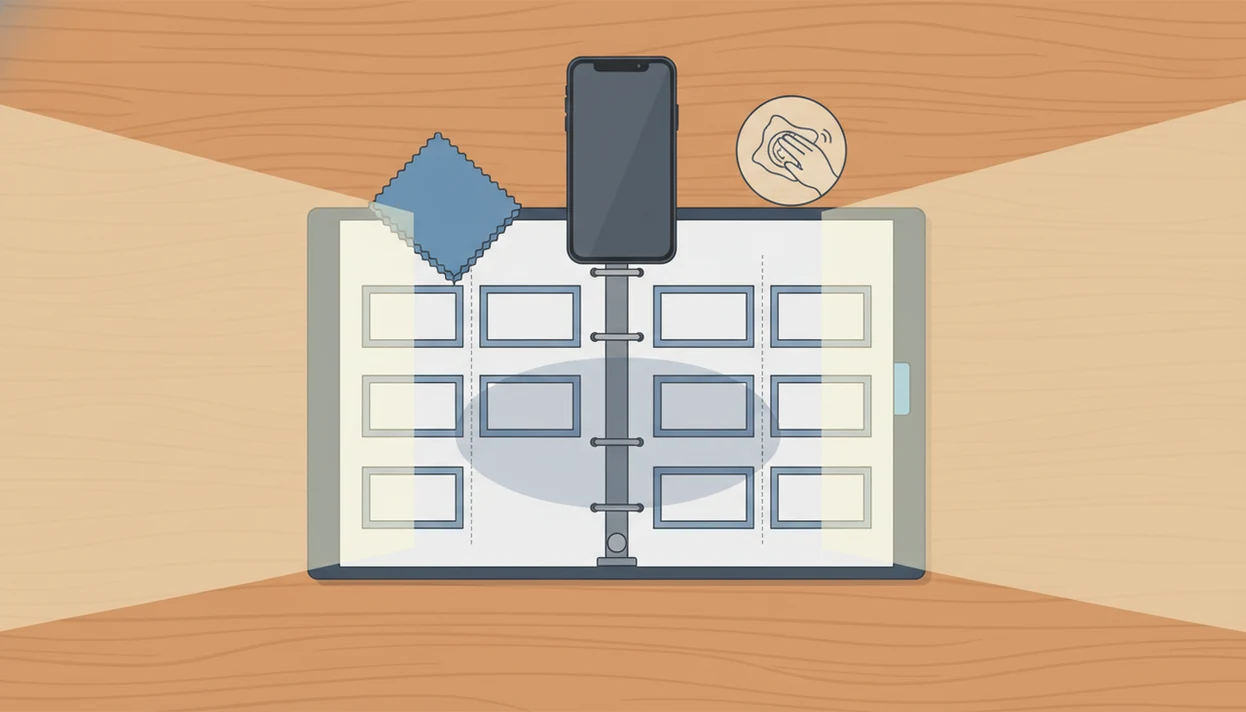
Clean the phone camera lens first, then wipe dusty binder sleeves with a soft cloth. Dust spots and fingerprints look small to your eye, but they can blur text, set logos, and card borders.
Use bright side lighting rather than a harsh overhead bulb. A card show table under fluorescent lights makes this obvious: the glare lands right where the set symbol should be. Move the binder until the shine slides off the page.
Place the binder page flat on a neutral background. Avoid curved pages, shiny top loaders, and deep shadows along the spine. If the page bows upward, press the binder gently at the edge, not on the card surface.
Keep all card borders visible. The app needs those borders to segment the page into separate card records.
How to Use a Phone to Scan Pokémon Binder Pages
Use the same scan order every time, because binder work gets messy once retakes begin. Front-to-back and left-to-right is simple enough to remember.
1. Create a binder collection
- Create a new collection or list before scanning, and name it by binder, box, or owner.
- Choose whether the collection is for selling, insurance notes, or personal tracking.
A dedicated Pokémon card collection tracker app helps keep scan history separate from loose-card experiments.
2. Frame one binder page
- Hold the phone steady above one page until all nine cards and borders are framed.
- Adjust side lighting if sleeves flash white across the artwork.
3. Review card matches
- Check detected names, sets, collector numbers, language, and variants before saving.
4. Save and repeat pages
- Save each reviewed page once, then repeat in the same order and flag uncertain cards.
5. Check the binder value
- Refresh prices after review, then export or track the binder value in a collection value dashboard.
Common Pokémon Card Binder Scan Mistakes That Skew Value
Full-binder scanning. Trying to scan both open pages at once usually creates weak matches, missed cards, and duplicate retakes.
First-match trust. The first AI match is a suggestion, not a final record. Check the set logo and collector number before saving.
Condition blindness. A cracked old top loader can hide edge wear in photos, while a clean semi-rigid holder usually shows corners more clearly.
Duplicate saves. Retaking a page and saving both versions can inflate the binder total.
Variant assumptions. Foil, reverse holo, promo, first edition, and misprint details are not always detected automatically.
Cash-offer confusion. Listed market price is not the exact amount a buyer, store, or show dealer will pay. Card Value Scanner delivers faster matching and pricing context, not a certified appraisal.
Binder Valuation App Price Checks for Expensive Pokémon Cards
For expensive cards, compare the app estimate against recent marketplace data before relying on the binder total. TCGplayer listings and eBay sold data are common references because TCGplayer explains market price as a data-based pricing signal (https://help.tcgplayer.com/hc/en-us/articles/360047231373-TCGplayer-Market-Price), and eBay shows sellers how to check completed or sold listings for real sale behavior (https://www.ebay.com/help/selling/listings/listing-tips/finding-sold-listings?id=4101).
| Price layer | What it means | What to verify |
|---|---|---|
| Raw value | Ungraded market range | Condition, language, variant, and recent sold listings |
| Condition-adjusted value | Raw estimate reduced or raised by wear | Corners, whitening, scratches, dents, and centering |
| Graded-value estimate | PSA, BGS, or CGC comparison range | Actual grade, cert details, and recent graded sale date |
| Binder total | Sum of saved card estimates | Duplicate scans and one card dominating the total |
Rare Pokémon sales have reached seven figures in public reporting; Guinness World Records lists a Pikachu Illustrator private sale at $5.275 million in 2021 (https://www.guinnessworldrecords.com/world-records/667950-most-expensive-pokemon-trading-card-sold-at-private-sale). If one card drives most of the binder value, rescan it outside the sleeve and refresh a sold-listing tab after weekend market activity. For selling prep, a Pokémon card price scanner for sellers workflow should still include manual comps.
Quality Review Checklist Before Saving Binder Scans
What should you check before saving scanned Pokémon binder pages? Confirm the card name, set logo, collector number, language, and variant before you trust the digital entry.
Look closely at regular holo versus reverse holo, promo stamps, first edition marks, and special stamps. A swirl pattern near the artwork may be collectible to buyers, but it does not replace set and variant verification.
Assign realistic condition notes instead of marking everything near mint. Tiny whitening along a blue card back can change the condition-adjusted estimate. Remove duplicates from page retakes, especially after lighting changes.
Mark uncertain cards for individual rescans outside the binder sleeve. After the binder is complete, refresh prices before sharing, exporting, or making sale decisions. For spreadsheets, collectors often use export Pokémon card collection CSV after the review pass.
Limitations
Phone binder scanning is fast, but it is not perfect. Use it to build a better pricing snapshot, then verify the cards that matter most.
- Glossy sleeves, curved pages, double sleeves, and top loaders can cause glare or failed detection.
- AI scanners may misread promos, foreign-language cards, misprints, older cards, and unusual variants.
- Phone scanners cannot professionally grade condition or authenticate a card.
- Live market prices can move daily and may be skewed by thin sales history or abnormal listings.
- Large binders still require manual review and can take significant time.
- A total binder value is an estimate, not a guaranteed sale price.
- Graded-value estimates depend on the assumed grade, which may be wrong without professional grading.
Refresh before acting. A new graded sale can shift the range overnight.
Apps such as Card Value Scanner, tcgplayer.com, pricecharting.com, and getcollectr.com can support different parts of the workflow, but no tool removes the need to inspect the card itself.
Should You Scan Pokémon Cards Through Sleeves or Take Them Out?
You can usually scan Pokémon cards through a clear penny sleeve or binder sleeve, as long as the sleeve is clean and glare-free. Sleeves are the biggest cause of failed matches on holo and reverse holo cards, because reflected light lands exactly where the set symbol and collector number sit.
Use this rule: scan through the sleeve for bulk pages, and remove the card whenever the value matters or the match looks wrong.
- Keep in sleeve: commons, bulk, non-holo pages, and any card you only need counted.
- Remove from sleeve: holos, reverse holos, full arts, promos, first-edition or shadowless prints, and anything the app values above roughly $20.
- Always remove from top loaders: thick plastic adds double reflections and hides corner wear that affects condition-adjusted pricing.
- Never scan graded slabs as raw: slab labels and case glare distort matching; check the cert and enter the grade manually.
In Card Value Scanner (cardvaluescanner.io), a sleeved bulk page and a bare high-value card can live in the same collection - the difference is how much manual review you give each entry. Scanning identifies and prices cards; it does not authenticate or grade them.
How Long Does It Take to Scan a Pokémon Binder?
Plan on roughly 30 to 60 seconds per 9-pocket page once you settle into a rhythm: about 5 seconds to frame and capture, and the rest for reviewing set, variant, and condition before saving.
- 1 page (9 cards): about 30–60 seconds
- 1 standard 4-pocket or 9-pocket binder (about 180–360 cards): roughly 20–40 minutes
- A 500-card collection: plan on about an hour, split into two sessions to avoid retake duplicates
- High-value cards: add 2–5 minutes each for sold-comp checks outside the app
Speed comes from consistency, not rushing. Scan front-to-back, left-to-right, save each page once, and flag uncertain cards instead of stopping to research mid-binder. Batch all your research at the end.
Card Value Scanner (cardvaluescanner.io) shows a running collection total as you save pages, so you can pause after any binder and still see an updated estimate. Totals shift as market data updates, so treat the number as a snapshot rather than a guaranteed sale price.
Frequently asked questions
How do I prevent glare when scanning Pokémon cards in a binder?
Turn off the camera flash and place the binder near a window or between two lamps that shine from the sides. Keep the phone parallel to the page, then tilt the binder slightly if sleeve reflections remain. Avoid direct overhead lights and bright sunlight. A dark, uncluttered surface beneath the binder can also help the camera detect card borders.
Why does my phone scan the wrong Pokémon card from a binder page?
Similar artwork, reprints, and parallel foil versions can confuse image recognition. Make sure the card name, collector number, set symbol, language, and foil pattern are visible. After scanning, compare those details with the suggested match instead of relying only on the picture. Manually correct uncertain results before calculating the binder's total value.
What camera settings work best for scanning Pokémon binder pages?
Use the rear camera at its normal 1x setting, with flash, portrait mode, filters, and digital zoom turned off. Tap the middle card to set focus and exposure. Use the highest practical photo resolution, but avoid ultra wide mode because it distorts cards near the edges. Clean the lens first and hold the phone parallel to the page.
Why are some cards missed when I scan a Pokémon binder page?
Cards may be missed when borders overlap, pockets sag, artwork is partly covered, or glare hides key text. Flatten the page, center it in the frame, and leave a small margin around every outer card. If one card is still skipped, scan that pocket separately. Dark cards and highly reflective foils often need a different light angle.
How can I avoid duplicate cards when scanning multiple binder pages?
Scan pages in a fixed order and mark each completed page in a simple checklist. Save or confirm the page before turning it, and do not rescan after an interruption unless you first check the collection. If the software supports folders, create one collection per physical binder. Review repeated card names carefully because legitimate duplicates can look like scanning errors.
Should I scan the backs of Pokémon cards in a binder?
The front is usually enough for identification, but the back helps when estimating condition. Photograph the back separately for cards that may be valuable, especially if you see whitening, edge wear, dents, stains, or creases. Binder page scans cannot reliably show every defect. Remove a card only when it can be handled safely and a closer inspection is justified.
How do I scan Japanese Pokémon cards in a mixed language binder?
Set the expected language before scanning when that option exists, then verify the Japanese set code, collector number, rarity mark, and artwork. Do not assign an English card's price to a Japanese printing simply because the images match. For mixed pages, scan difficult cards individually. Card Value Scanner can help organize results, but language and printing still require manual confirmation.