
Price Pokémon Cards Before Selling on eBay With Sold Comps




To price Pokémon cards before selling on eBay, identify the exact card variant, judge its condition, compare recent sold comps, then adjust your listing price for fees, shipping, and offer room. Do not use the highest active listing as the card’s value because active listings show asking prices, not completed sales.
Pricing Pokémon cards before selling on eBay means using exact card identification, condition review, and recent sold comps to choose a realistic listing price.
TL;DR
- Use sold eBay comps, not active listings, because sold listings show what buyers actually paid.
- Match the exact card version: set, number, rarity, language, holo type, edition stamp, and grading status.
- Set your final list price after accounting for condition, shipping, seller fees, and whether you want auction, fixed price, or Best Offer.
| Need | Best option |
|---|---|
| Card Value Scanner | Identifying a card from a photo, checking market signals, and organizing cards before resale |
| TCGplayer | Checking U.S. marketplace prices for raw cards, especially modern English singles |
| PriceCharting | Reviewing raw and graded historical price trends |
| Cardmarket | Comparing European marketplace pricing and availability |
At-a-Glance eBay Pricing Workflow for Pokémon Card Sellers
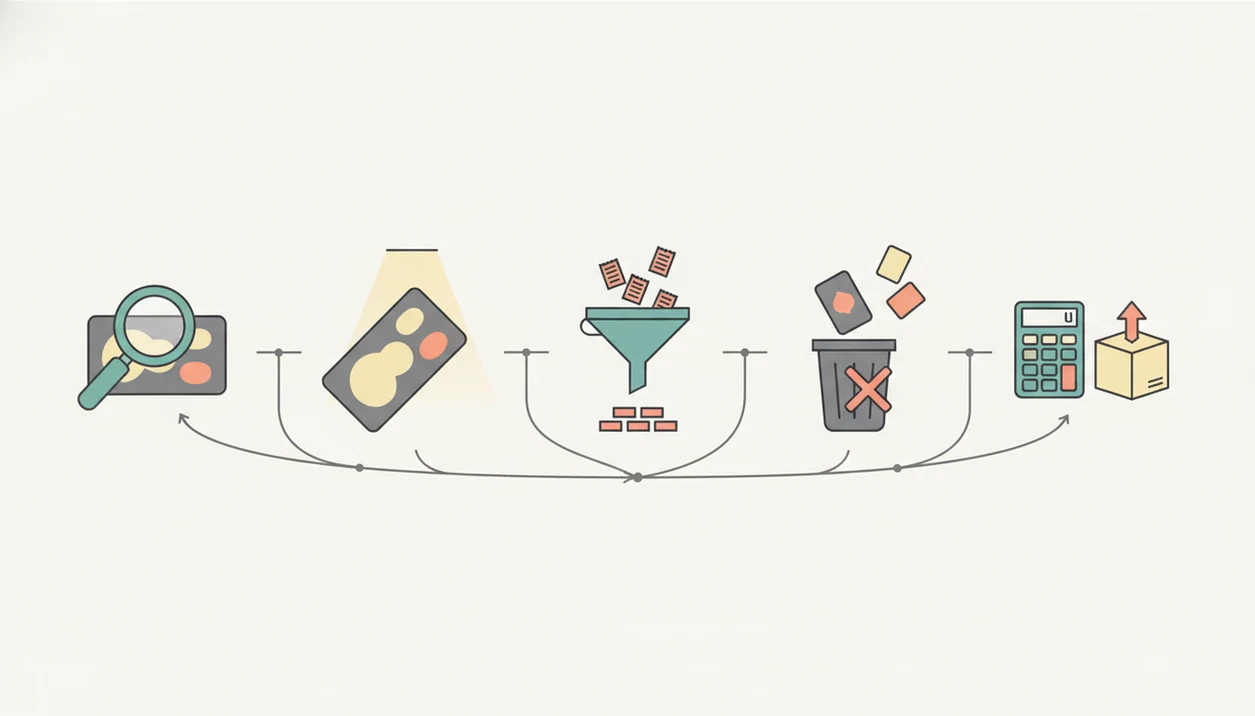
- Identify the card first. Match the set, card number, variant, language, and raw versus graded status before looking at prices.
- Inspect condition next. Tiny whitening along the blue back can move a card out of near mint, even when the front looks clean.
- Filter sold comps only. eBay reported 132 million active buyers and $74.7 billion in 2024 GMV, so its completed sales can be useful price evidence at scale, according to its annual report source.
- Remove bad comps. Different grades, languages, bundles, and damaged copies should not drive your list price.
- Calculate the net listing plan. Adjust for shipping, packaging, fees, offer room, and listing format.
Tools like Card Value Scanner can speed up the first identification and market-price check before you manually verify seller comps. Treat this as a pricing snapshot, not a promise.
Before You Start: What You Need to Price Pokémon Cards on eBay
Before pricing, set up a small inspection station and make sure you are looking at completed eBay sales. The goal is to avoid mixing bad condition notes, active asking prices, and mismatched slabs into one messy number.
- Place the card on a clean, dry surface with a sleeve nearby, then use bright angled light so whitening, dents, scratches, and holo wear are easier to see.
- Open eBay sold or completed filters before searching comps; active listings and promoted results can show what sellers want, not what buyers paid.
- Record the set number, language, holo type, raw condition estimate, and early comp range in a notes app or spreadsheet as you work.
- Separate raw cards from PSA, BGS, CGC, or other graded slabs before comparing prices, because slabbed sales reflect grading confidence as well as the card.
- Photograph visible flaws before choosing comps, especially corner wear, back whitening, surface dents, bends, and scratches that could move your copy below a cleaner sale.
How Pokémon Card Sold Comps Work on eBay
Sold comps are completed sales for similar cards, not current asking prices. They show what a buyer actually paid after the listing ended, which makes them more useful than active listings when setting a current market range.
eBay’s 2024 annual report says the platform had 2.3 billion live listings. That scale is useful, but it also means active listings may be inflated, stale, duplicated, or speculative. A Charizard peeking from a shoebox can look valuable at a glance; the sold tab decides whether buyers agreed.
Good comps depend on tight matching. Search filters, title terms, photos, condition notes, shipping cost, and auction timing all affect quality. A weekend auction ending at 2 a.m. may not mean the same thing as a Buy It Now sale with clear photos.
It is not a final appraisal that replaces sold-comp review.
How to Use Seller Comps to Price Pokémon Cards Before Listing
Use seller comps as a short workflow, not a one-click answer. App-based market prices can narrow the search, but your eBay listing still needs manual comp verification.
- Scan or identify the card by name, set, number, and image, then write down the matched variant.
- Verify the tiny card number line at the bottom left or bottom right before trusting a name match.
- Inspect condition under angled light, including corners, back edges, holo surface, dents, and bends.
- Search eBay sold listings using the exact card name, set number, rarity terms, and variant words buyers use.
- Remove comps with mismatched grade, language, holo type, bundle contents, or unclear photos.
- Set a listing price from the usable range, then adjust for fees, shipping, and offer room.
For a phone-based workflow, the app to help price Pokémon cards before selling approach works best when it feeds into sold-comp checking rather than replacing it - see also tool to scan and sell Pokémon cards.
Step 1: Match the Exact Pokémon Card Variant Before eBay Comps
“Is this the same Pokémon card as the sold listing?” is the first question to answer before using any comp. Similar artwork can appear across multiple sets, promos, reprints, languages, and rarity treatments.
Check the set name, card number, rarity symbol, language, holo or reverse holo surface, promo stamp, first edition mark, shadowless status, and grading status. The glare from a penny sleeve can make a scanner confuse holo and reverse holo surfaces, so take the card out only if it’s safe and clean to do so. No rush.
Photo scanning is a fast first pass. Seller verification still matters before money changes hands. Apps such as Card Value Scanner, tcgplayer.com, and pricecharting.com can help narrow the card identity, but the seller should confirm the matched variant against the actual card.
Raw cards and graded cards should not be comped together unless you are separately estimating grading upside. For most sellers, exact variant matching is often more useful than broad name searching because Pokémon card names repeat across printings.
Step 2: Grade Raw Pokémon Card Condition Before Seller Comps
Condition is the adjustment layer between a matching card and a realistic selling price. Research on eBay collectible auctions found that item quality and seller signals affect final sale outcomes, and Pokémon cards follow the same practical pattern source.
- Front surface: Look for scratches, dents, bends, creases, stains, print lines, and holo scratching under angled light.
- Back surface: Check whitening, edge wear, corner chips, grime, and pressure marks. A cracked old top loader can hide damage that a clean semi-rigid holder shows clearly.
- Corners and edges: Compare all four corners, not just the best-looking one.
- Centering: Note whether borders are noticeably uneven from left to right or top to bottom.
- Raw label: Use near mint, lightly played, moderately played, heavily played, or damaged as estimates, not promises.
Visible defects should be photographed clearly. Condition affects buyer trust, final sale price, and return risk. For raw cards, honest condition notes often prevent the worst messages after delivery.
Step 3: Filter eBay Sold Comps for the Same Pokémon Card
Search sold listings with the exact card name, set number, rarity terms, and identifiers a buyer would type. For example, include words like “reverse holo,” “promo,” “1st edition,” “Japanese,” “PSA 9,” or the set abbreviation when they apply.
Use sold or completed listing filters, not active listing prices. Then compare the title, photos, condition notes, sale date, shipping cost, and listing format. Auction results and Buy It Now results can both be useful, but they reflect different buyer behavior.
Recent comps usually matter more than old comps, especially for volatile modern cards. We have refreshed a sold-listing tab after a weekend card show and watched a chase card’s range shift once new graded sales posted.
For sellers checking comps on a phone, the process in how to check Pokémon card sold comps with phone is often easier than switching between a camera roll, browser tabs, and notes.
Step 4: Remove Bad Pokémon Card Comps Before Pricing
Bad comps are sold listings that look relevant in search results but differ in a way that changes value. Remove them before choosing your listing range.
| Comp type | Use it? | Why it matters |
|---|---|---|
| Same card, same language, same holo type, similar raw condition | Usually | This is the closest pricing signal. |
| Same card name but different set number | No | Artwork and names repeat across printings. |
| PSA, BGS, or CGC graded copy versus your raw card | Usually no | Grading changes buyer expectations and price behavior. |
| Bundle or quantity lot | No | The sale price may include multiple cards. |
| Outlier auction with poor photos or strange bidding | Be cautious | Timing, weak images, or bidding wars can distort value. |
One recent sale is not enough when sales volume is thin. Use a range or median-like cluster instead of the single highest sold price. If three clean comps sit near one range and one sale is far above it, the lonely high result should not set your price.
Step 5: Set an eBay Listing Price After Fees and Shipping
Start with the usable comp range, then adjust for your card’s condition compared with those listings. A card with clearer whitening, worse centering, or heavier holo scratches should usually sit below cleaner comps.
Next, account for eBay selling fees, any payment-processing impact where applicable, packaging, tracking, and shipping strategy. Buyers compare total cost, not just the item price. Check eBay's current selling-fee table before publishing because category fees, promoted-listing choices, and shipping policies can change source. A $45 card with $6 shipping may compete against a $50 listing with free shipping.
Choose auction when demand is strong, your comp confidence is lower, or you want faster sale exposure. Choose fixed price when comps are stable and you can wait. Add Best Offer when you want negotiation room, but avoid pricing far above recent sold comps.
For sellers, a condition-adjusted estimate is often better than copying the highest comp because it reflects what your specific card is likely to net after sale costs.
Common Myths About eBay Pokémon Card Pricing
- Myth 1: The highest active listing equals value. Active listings show asking prices, not completed sales. A seller can ask anything.
- Myth 2: All copies of the same card are worth the same. Language, set, holo type, edition, and condition can split prices sharply.
- Myth 3: Graded and raw comps can be mixed freely. A PSA slab creates different buyer expectations than a raw card in a sleeve.
- Myth 4: One sold comp is enough. One sale can reflect odd timing, weak photos, or a bidder who simply wanted that copy.
- Myth 5: Scanner prices replace condition review. Scanner app prices should support the workflow, not replace variant checks and defect photos.
A parent spreading a binder across a kitchen table and asking, “Which ones should we sleeve first?” needs triage first, then pricing. Card Value Scanner can help sort the first pass, while a Pokémon card price scanner for sellers workflow should still end with verified comps.
Verification Checklist Before Publishing a Pokémon Card eBay Listing
Before publishing, confirm the exact card identity, condition label, photos, title keywords, category, shipping method, and return settings. Then check that the final listing price still fits recent usable sold comps after condition, shipping, fees, and offer-room adjustments.
Make the title precise without keyword stuffing or false rarity claims. “Charizard 4/102 Base Set Holo MP” is useful if accurate. “Rare investment PSA?” on a raw, scratched card invites disputes.
Save screenshots or notes of the comps you used. A small note like “three LP reverse holo sold comps, last 30 days, $18 to $24 before shipping” helps if you reprice next week. It also keeps your future self from guessing.
The Pokémon card selling checklist is useful when you are listing several cards at once and need the same checks repeated without skipping shipping or return details.
Limitations
Sold comps are useful, but they are not clean laboratory data. Treat every number as a source-timestamped estimate.
- Active listings are not reliable price evidence because they show asking prices, not completed sales.
- Single-card pricing is noisy when sales volume is low, especially for obscure promos or low-pop graded slabs.
- Condition labels are not perfectly standardized across sellers; one person’s near mint may be another person’s lightly played.
- Scanner or app prices can lag fast-moving market changes if they are not refreshed from recent sales.
- Graded-card pricing does not transfer cleanly to raw cards because the slab, grade, and grader affect buyer confidence.
- Shipping cost, international sales, bundles, promoted listings, and free-shipping strategies can distort comparisons.
- Auction timing can make a good card sell below normal market range, especially on weekday mornings or during major event weekends.
eBay Fee Math: What You Actually Keep on a Pokémon Card Sale
A sold comp is a gross number, not your payout. Before you accept a price, work out net proceeds so you know whether the sale is worth the packing time.
A practical estimate: Net = (item price + shipping charged) − eBay final value fee and per-order fee − any promoted-listing ad rate − actual postage − packaging. Fee percentages vary by category, store subscription, and country, so confirm your current rate in eBay's fee schedule before relying on the figure.
- Item price: anchor it to matching sold comps, not the highest active listing.
- Shipping charged: buyers compare delivered cost, so free shipping usually means the postage is baked into the price.
- Promoted listings: an optional ad rate comes off the top of the sale, so add it to your cost line if you use it.
- Supplies: sleeve, top loader, team bag, rigid mailer, and tracking all reduce the margin on low-value cards.
- Offer room: if you list with Best Offer, price so the expected accepted offer still clears your net floor.
Because fees and postage are fixed-ish costs, they hit cheap cards hardest. Many sellers set a minimum single-card threshold and bundle everything below it into lots. Card Value Scanner helps at this stage by identifying cards from photos and showing market prices and collection totals, so you can see quickly which cards deserve individual listings and which belong in a lot. Treat all of it as an estimate, not a guaranteed payout.
Best Tool for Each Step of Pokémon Card Sold-Comp Research
No single tool does identification, comp history, and payout math well. Sellers get faster results by using the right tool per step.
Ludex connects collection tools to eBay listing creation, while Ludex vs Card Value Scanner contrasts that workflow with Pokémon-focused sold listings and price charts on iPhone.
- Card Value Scanner - best for the first pass: identify the card from a photo, confirm set and variant, see market and graded value context, and track collection totals before you list.
- eBay sold/completed filters - best for the decisive evidence: what buyers actually paid recently on the platform you are selling on.
- eBay Terapeak (in Seller Hub) - best for longer sales history, sell-through rate, and demand trends on a search term.
- TCGplayer - best for U.S. raw modern English singles and quick market-price sanity checks.
- PriceCharting - best for long-term raw and graded price trend lines.
- Cardmarket - best for European pricing and availability comparisons.
A workable order is: scan to confirm identity, check eBay sold comps for the same variant and condition, then use Terapeak or PriceCharting to judge whether the recent cluster is a trend or a spike. Remember that scanning identifies and estimates; it does not authenticate or grade a card, and only a grading company can assign a grade.
Which Pokémon Cards Are Worth Listing Individually on eBay?
List a Pokémon card individually when its expected net payout justifies the time required to identify, photograph, describe, pack, and ship it. Low value cards often make more sense in a set, character, rarity, or bulk lot.
Start by sorting cards into three groups: individual listing candidates, themed lot candidates, and true bulk. Use a Card Value Scanner or set checklist for quick identification, but confirm the collector number, set, finish, and condition before moving a card into the individual group.
- Individual listings: Consider chase cards, vintage holos, popular promos, scarce variants, graded cards, and clean cards with enough recent sales to support a reliable price.
- Themed lots: Group lower value cards by Pokémon, evolution line, set, rarity, artist, type, or era. Buyers can understand these lots more easily than random assortments.
- Bulk: Place common cards with little individual demand into clearly counted lots. Separate basic Energy cards unless they are collectible prints.
Set your own minimum net payout for an individual listing. Calculate the likely sale price, then subtract eBay fees, shipping supplies, postage, and any promoted listing cost. Also account for your handling time. A card that sells for several dollars may still produce less profit than adding it to a well-organized lot.
Do not bury a valuable card in bulk because an app failed to identify it. Pull aside older cards, holos, reverse holos, full arts, secret rares, stamped cards, first edition cards, and unusual promos for manual review. Recheck borderline cards when demand changes or a related Pokémon becomes more popular.
Frequently asked questions
Should I use an auction or Buy It Now for a valuable Pokémon card?
Buy It Now is usually safer when recent sales establish a clear value, especially for scarce or high-value cards. Auctions work better when demand is strong and several buyers are likely to compete. If you choose an auction, avoid ending it at an inconvenient hour. A rare card can still sell cheaply when few interested buyers see the ending.
What should I set as the starting bid for a Pokémon card auction?
Set the starting bid at the lowest amount you would genuinely accept, after considering fees and packing costs. A low opening bid may attract attention, but it also creates the risk of a one-bid sale. For cards with uncertain demand, use a higher starting bid or a fixed-price listing instead of assuming competition will raise the price.
How can I tell what Best Offer was accepted on a sold Pokémon card listing?
When eBay displays a crossed-out price with “Best Offer accepted,” the visible amount may not be the actual sale price. Treat that listing as a price ceiling, not an exact comp. Compare it with ordinary sold listings for the same card. Third-party sales archives sometimes record accepted amounts, but coverage can be incomplete, so verify before relying on them.
How do I price a Pokémon card when there are no exact sold listings?
Start with sales of the closest comparable version, then adjust cautiously for rarity, language, condition, and demand. You can also review sales of the same card in nearby grades or similar cards from the set. Use a fixed price with Best Offer if uncertainty is high. Do not assume that no sales automatically means the card is extremely valuable.
Can I use graded Pokémon card sales to estimate the value of a raw copy?
Graded sales can provide context, but they should not be converted directly into a raw price. A slab’s value includes verified condition, authenticity, grading costs, and buyer confidence. Compare raw sales first. If none exist, use several graded levels and subtract a conservative amount, remembering that a clean-looking raw card is not guaranteed to earn a particular grade.
Should reverse holo and regular Pokémon cards use the same eBay comps?
No. Reverse holo, regular, standard holo, promotional, stamped, and special parallel versions can have different demand and print populations. Confirm the foil pattern, card number, set symbol, rarity, and any stamp before searching. Add terms such as “reverse holo” to your query, then inspect listing photos because sellers sometimes label foil variants incorrectly.
Is it better to sell inexpensive Pokémon cards individually or as a lot?
Individual listings make sense when a card has steady demand and enough value to justify the work. Bulk commons, duplicates, and low-value cards are often more practical in clearly described lots. Group cards by set, Pokémon, rarity, or era rather than making random bundles. Price the lot below the combined individual value because buyers expect a convenience discount.